Hello everyone!
Today's post is just about blogging in general. I thought that I would share what I've learned over the time I've spent blogging and create a handy list of key tips, and also things to avoid. I'm not saying I'm an expert because I'm far from it, I'm still learning every day, but these are just some of the key things I've learned so far and I wanted to make a post about it so that any readers can use these tips to help on their own blogs.
- Post regularly. I'm one of the worst people for timekeeping so things often get on top of me and I forget to do things in the process - blogging being one of them. Blogger has a handy stats tool though which allows me to see how many hits my blog has got at any given moment in time, and I have noticed that without fail, every single one of the times that my blog has had high traffic has been when I've been posting lots, and similarly, I get next to no views when I don't post anything for a while.
- Keep it simple. When I first started out, my blog was a horrendous mix of clashing neon colours and crazy fonts when I formatted it for the first time. Even I struggled to read what I'd written with all of the distracting visuals and strange background colours. Looking back, it looked awful, and I'm so glad that I realised it very quickly. I much prefer my blog black and white with just a splash of colour, it looks much more professional. I've noticed that many popular blogs look very simple and clean, probably because they don't want anything to overshadow the content, which makes a lot of sense. I also have a lot more readers now that my blog is actually, well, readable.
- A picture is worth a thousand words. No, really. The posts that I've made which include pictures have all attracted far more views than any of the larger posts I have made which don't include pictures, which makes me think that it's a good idea to use them when possible.
- Stay connected. One of the biggest tools that a blogger has is other bloggers. Blogging is a community after all, and when you help each other, it benefits you both. You can each guest post on each other's blogs and help to promote each other, and you will both benefit from it. And don't forget to communicate, great friends can be made when you comment on each others' posts regularly!
- Be yourself. I know that it seems obvious, but there is a lot of pressure to be competitive in the blogging world and that sometimes leads people to shy away from their originality. However, I know that when I read blogs by other people, I prefer it when the writer seems friendly and human and I don't mind if that means weird and slightly messy, in fact I find it endearing. Don't be afraid to make mistakes because nobody will judge you for it, and people may even like you more for it.
... and here's what to avoid...
- Background music. It drives me crazy! We came here to read, and we can not concentrate with music blaring uncontrollably while we're trying to do so!
- GIFs as decoration. They're fine when they're used in posts, but when your blog is filled with them just for the sake of it and they're constantly dancing around and flashing when you're trying to read, it's very distracting.
- Bad grammar. I know it's petty, but spelling and grammar checkers are there for a reason. Use them, because if you don't, it makes your blog look incredibly sloppy.
- Horrendous colour schemes. I learned this the hard way.
- Negativity. Be nice to each other! There are already too many wars in the world, we don't need them online, too!
Lauren xxx
Showing posts with label IT. Show all posts
Showing posts with label IT. Show all posts

Blogging Platforms: My Experiences
Hello again!
Today's post is about the thing that most bloggers are stumped with first when they decide to start blogging: which blogging platform, and what's different about them. Now honestly, I've heard so many different opinions on which platform is the best that it's hard to come to a definitive answer. What I've gathered is that different ones are better for different purposes and different people, and since a non-objective approach to this question seems to be the most fitting, I'm going to write about my own opinions on the matter.
The very first platform I ever started using was Tumblr. Way back when I was around 14 and I stumbled across it, it was nowhere near as popular as it's grown to be now. It was mostly filled with amateur photography and teenagers complaining (I was one amongst them). However, since then it has developed much more status in the blogging world, often being a platform that most artists and other creative people turn to due to the image-based format of the site and the ease of uploading multi-media posts. I like this about Tumblr, because it makes discovering new artists and viewing their work in high-resolution very simple, and I like how there is no 'default' posting format, so to speak. You can literally post any kind of media: pictures, videos, speech, sound clips - anything, with ease, because it's not automatically assuming that you'll be wanting to write a text post like most blogs do. For this reason, I still use Tumblr now to host my Art blog. I also like the tagging system used on Tumblr; it makes your posts easy to find, and it makes finding others' posts on chosen topics easy to find. There's also the added benefit of the daily laugh you get with Tumblr, because there's a lot of blogs on there posting an abundance of internet-based humour, which is a nice thing to have on your dashboard. I think Tumblr is very easy-to-use, and I like the fact that the Tumblr community seems to be very informal and social. However, I have found that it has a lot of down-sides. Firstly, unless you're good with HTML coding, customising the appearance of your blog to anything other than a simple, pre-designed theme can be very tricky. There are no options to even make small changes to existing themes such as changing font colours without changing the actual HTML code, which sucks a little. Also, it's impossible to browse in public. Because Tumblr is one of the few platforms that still allows NSFW content and blogging, it's not uncommon to be leisurely scrolling down a dashboard of completely normal blogs when you get the shock of your life, because one of them has reblogged one out-of-the-ordinary post. Especially not good when there's someone stood behind you who completely misunderstands the situation. Not good at all. It's also easy to go off-topic from your blog's main purpose with Tumblr, because there are so many pretty pieces of art on there that you can find yourself listlessly reblogging hundreds of image posts and forgetting to write any actual text, or losing your text posts in between the hundreds of reblogged images.
The second platform I used was WordPress. I don't actually use this platform anymore, despite not finding much wrong with it. I guess the reason I started using it was because I wanted to try a more 'traditional' way of blogging, heavy on the text posts, simple and easy. I figured that because WordPress was a text-based platform, it would be a good one to use. I started blogging about things that I did and was planning on doing, like baking cakes, attending social events, planning tattoos etc, basically a lifestyle blog. I found that it was really easy to use. Formatting was easy enough and I was able to make my blog look suitably pretty without too much fuss. Posting was easy, too. I figured it out pretty much straight away, which is always a bonus. I liked the dashboard, too, and how it picked out a few blogs to follow based on your interests. I remember my dashboard always being filled with really interesting, artsy textile posts from really great bloggers. I never got many views there though, which I didn't mind, but if I was planning on blogging about something that I needed as many people as possible to see, it would have been an issue. I found it pretty hard to connect with other bloggers there, too. Other than the crafty-type blogs that I followed and appeared on my dashboard, just browsing was pretty hard. I couldn't really find many more blogs, and I wanted to because I wanted more variation than reading posts from the same few people all the time. I guess I just felt kind of cut off from the community, because people weren't as involved in each other there as they were on Tumblr, which I was used to. None of this was really an issue though, and I guess the reason why I moved eventually was purely because WordPress was decreasing in popularity, and there were more other bloggers to connect with elsewhere.
That's when I started to use Blogspot, which obviously, I still use now. I like Blogspot because it's text-based, which makes traditional blogging easy, but since it's more popular there are more other bloggers on it to follow and connect with. I find it very easy to just browse here, too, using the 'next blog' feature. I find formatting very easy on Blogger because panels can be dragged around in settings and widgets added, and in addition to this the customize tool allows you to change small details like fonts and colours with ease, without having to be totally HTML-savvy. One thing that I also really like about Blogspot is that it's linked to Google Plus. It makes sharing posts with more people really easy, and it's another way to connect with other bloggers. I just think that it all works really well. I love the way that blogger offers stats as a feature, too, so that you can see exactly where in the world and which sources your traffic is coming from. The option of having multiple blogs on Blogger is great, too, especially for people like me who like to have their own personal blog as well as others for certain projects, like this one. I think that the only thing I don't like about Blogger is the lack of a proper dashboard. I know that there is one, but it doesn't really feel like a proper dashboard to me, and it's not so easy to browse.
Then finally, my most recent blogging muse is a new site called Ello, which is developed especially for creative people and is ad-free. It's currently still in beta-testing so I haven't had chance to properly blog on it yet, but I've found my feet and I think that it's simple enough to use. Formatting is fairly minimal on here so that gets rid of the problem of working out how to format your page etc, and I quite like the minimalist approach to it all. It basically just does what it says on the tin, and does it well, without all the ads and popups that other sites have. The community is pretty limited because it's just starting up but it's slowly getting bigger. Similarly to Tumblr, it's quite image-heavy but doesn't rely on that so much, although there is still a feature similar to Tumblr's reblog. I like it. I can see it going places.
So, that's all of my experiences with different platforms. There are loads more, but these are just the ones I have tried. Which platform is your favourite? How many others have you tried? I'd love to know your thoughts!
Lauren xxx
Social Networking: Why it's important
Hi everyone!
Today I wanted to talk about something that is often overlooked as a business tool: social media.
Social media is something that is absolutely everywhere these days, with the ever-growing popularity of sites such as Facebook, Instagram and Twitter. For most people, they are simply ways of passing the time, nosying around their friends' lives (or keeping an eye on their ex-boyfriends...), or procrastinating when there's work to be done, which we're all guilty of, especially me. However, sites like these hold a lot of power in their format due to their ability to easily reach a huge number of people very quickly, at the click of a button. Look how quickly things spread around Facebook and eventually go viral: that's the power that these sites have, and if they can make something as daft as a cat playing the keyboard fly around the world's computer screens within days, imagine what they could potentially do for a business.
This could be confusing you at this point, because you're thinking "how does this relate to blogging?" Well, for many people who have found success with their blogs, their blog is in fact a business, and a high-earning one at that, with the blogging industry growing faster than ever and more and more people reaping the financial benefits of having a blog. Just like a shop on a high street, more people visiting usually means more money, and with a blog it's exactly the same. The more hits the blog gets, the more money it's worth, so the main goal of most bloggers is to get people to visit their page in the first place, and that's where Social Networking comes in.
What are the chances of some random person knowing your exact url and typing it into their browser? It's really not very high, as you can imagine, thus other ways of directing people are needed. Think about when you visit new blogs, how do you access them? A lot of the time it will be through external links on other Social Media sites, through search engines like Google, or because someone on a conversation thread has linked other people to a blog. If it works on you, chances are, it's going to work on other people. This is why cross-referencing yourself on as many social media accounts as possible is important, because it means that if someone reaches you through just one of these accounts, which at some point someone inevitably will, they automatically are connected to your whole online business persona, and have immediate access to all of your social media accounts and very importantly, your blog.
There are so many options when it comes to social networking that it can be hard to find your feet at first, but it's about making smart decisions and choosing which platforms suit your business best.
Facebook is a good all-rounder. Their huge database of users means reaching a lot of people, and it's a suitable place for smaller sites and companies as much as it is huge corporate industries and very well-known, high-traffic sites. Twitter is also good for reaching many people but it's a little more personal as you're posting small snippets of your own dialogue, which can be handy in the blogging community as it can feel more personal when communicating with followers, which tends to be something desirable when blogging. Instagram and Flickr are both good for more visual bloggers such as artists or people who review products and need to post pictures of them, as they allow for very easy access to a large amount of images. Google Plus is a good networking tool for bloggers in particular, as it is linked to Blogger so it's easy to find other fellow bloggers and people interested in blogging through it, who may become strong contacts and gain you more traffic as you help each other and collaborate. There are also very new, creative networking sites such as Ello, which is a new, ad-free creative social network made especially for people interested in visual media. There are also sites such as Bloglovin' which are made especially for bloggers, by bloggers.
This list has barely touched on the many possibilities of social networking available, but it goes to show that there's something for everyone, you just have to find what works for you. In my experience, most of my followers gained on my blogs have been through linking to my other social media accounts, as people tend to click on the links they see on there more than searching for your blog directly. Blogger is very handy in identifying where your traffic is coming from as it actually shows you stats like that in your account info, alongside things like where abouts in the world your blog gets the most views.
Do you have a blog? If so, how do you gain traffic? Do you find that social networking helps?
Lauren xxx
Pechakucha Presentations
Hi guys! So a few weeks back in professional studies we learned about a presentation format called Pechakucha which I'd never heard of before, and I wanted to make a post about them because I think that they're a really good idea. The basic idea of these presentations is to get across key pieces of information in a short space of time preventing rambling thus boredom and all kinds of such catastrophes. The format is 20 slides, which advance automatically and have no text on them, and last for 20 seconds each, so it's 20x20. You can do a Pechakucha on absolutely anything, but they're really popular within the design/creative community. It's even become such a craze that people hold Pechakucha evenings (ngl I really really want to go to one of these) which are casual social events where a little group of people each do a Pechakucha and drink and have snacks and things and I think it's all different kinds of adorable! Aside from that though I think for people like me it's a great format because I really struggle with things like presentations because I get anxious and I worry that if I have to read off a screen then I'll do something silly like stumble over my words and everything will go wrong, but since it's so quick there's no time for nerves and because there's no text on the slides you don't have that awful (and boring) reading-off-the-screen thing going on and it just feels more natural altogether because you just look at the image on the screen and it kind of jogs your memory into speaking about the image so that it's spontaneous and it feels more like talking to a friend than 'doing a presentation'.
Anyway, I just thought that it was a really cool concept and I really want to go to one of these Pechakucha evenings! Hope you guys found it as interesting as I did!
Lauren xoxo
Anyway, I just thought that it was a really cool concept and I really want to go to one of these Pechakucha evenings! Hope you guys found it as interesting as I did!
Lauren xoxo
Visual Communication: The big hand-in!
Hi everyone! really sorry I've been a bit quiet for ages again, hand-ins have been hectic! The big ones are done now though, so I thought I would just write a quick post to tell you about it. Okay, so the first hand-in I had was for visual communication; the module that the work in the previous post was for. This one was made up of two parts, hand-rendering and IT, which eventually came together in three final boards depicting a chosen collection, garment flats of it made on Adobe Illustrator, and your final illustrations of the collection which were made by hand-rendering first and were then scanned in and coloured digitally. If any of you missed my previous posts on this module, they can be found here and here! There was such a huge rush towards the end of my time up until the deadline and I was like a woman possessed trying to get it all done! I managed it in the end though with a whole three minutes to spare!!! (Time management isn't my strong point at all as you can tell!) Here's my final three boards for the project!


I'm really pleased with them, especially the last one with my final illustrations on!
Alongside this we also needed to hand in a sketchbook showing evidence of hand-rendering work and experimentation with different media. This bit was the worst and I didn't get much sleep getting it done! There was loads of work in it by the end though so I can't post every bit of it on here, but here are the best bits, and a few edits of them I did on photoshop as experiments!


Alongside this we also needed to hand in a sketchbook showing evidence of hand-rendering work and experimentation with different media. This bit was the worst and I didn't get much sleep getting it done! There was loads of work in it by the end though so I can't post every bit of it on here, but here are the best bits, and a few edits of them I did on photoshop as experiments!
Josephine Bowes' Dress, Bowes museum, from life, Oil Pastels.
Kate Moss, from reference, watercolours and fineliner.
Vanessa Paradis, from reference, ProMarkers and Adobe Photoshop.
Photoshop experiment from a reference of an Estee Lauder magazine advert.
Final Illustration 1, Photoshop.
Final Illustration 2, Photoshop.
Final Illustration 3, Photoshop.
Final Illustration 4, Photoshop.
Experiment in drippy inks, from magazine reference.
Hand studies, from life and magazine references.
Feet studies, from magazine references.
An eye, Biro Pen, from reference.
An eye, graphite pencil, from reference.
Negative drawing of a bird's nest done on a workshop at the Dorman Museum, Middlesbrough. Graphite crayon and eraser, from life.
Montana Forbes study, ProMarkers.
Freya Flavell study, Watercolour.
Freya Flavell study, ProMarkers.
Ilse Valfre study, Oil Paints.
Hajin Bae study, coloured pencils.
Sabine Pieper study, Oil Paints.
Sky Ferreira, Biro pen, from reference.
Edits, Adobe Photoshop.
Hope you enjoyed seeing my work! I'm really pleased with how it all turned out. I'll be updating my art blog with it soon. I also had deadlines for my technical folder and my design project too, but I'm still yet to get decent phots of it, but I will make a post on it when I've got some!
Lauren xoxo
Flickr
Hello everyone! I'm really sorry I haven't posted in ages, I have upcoming deadlines for my design project and it's keeping me really busy, but I'll try and post some more when I can. Just a quick update to say that I've just opened a Flickr account, and if you want to view my photos or follow me, you can find it here. I have some upcoming posts about museum trips and things where I took a lot of photos which I want to share with you all, so I thought I could just start creating albums on Flickr and link you all to them when I post about each trip so that you can see properly!
Lauren xoxo
Lauren xoxo
Visual communication IT - my work so far!
Hi guys!
I'm sitting in my vis com IT lesson as we speak and now I've FINALLY got my flats drawn that I was talking about before, I need them checked before I can scan them in to render on illustrator, but Lynne is doing tutorials with everyone at the mo, so I thought I'd tell you about my work so far while I wait!
OK. So, the first thing we did was learn basics on illustrator, which I made a post about, remember? (If not, here it is: http://laurensheperia.blogspot.co.uk/2013/10/intro-to-adobe-illustrator.html) We made a few different flats up after this first lesson, just to get used to different things, and I made a button template for my archive, and here they are:


Next, we had to choose a spring/summer '14 collection to work on for our project on range plans. I had a look around, and found one I liked on the London Fashion Week website by L'wren Scott. I liked her collection because a lot of the garments seemed to be inspired by traditional Japanese culture and garments like kimonos and yukatas, and I personally am very interested in Japanese culture. Oh, which reminds me, I just bought a vintage kimono and obi from Japan and I'm waiting for it to arrive, so expect a post about it in the future! But anyway, I chose 4 outfits from the collection to work on that fitted together well, but were each very different in terms of shape. Here they are:


You can find more info on L'wren Scott and the rest of the collection here.
So then, after I'd chosen, I had to draw some garment flats (hand-rendering) from the photos of the collection, which are the things I'm waiting to get checked as we speak! I found it more challenging when I did it than I was expecting. I hope they're ok, I don't really want to do them again haha! But anyway, here they are:


Sorry the photos are a bit dark!
So finally, we started making up our art boards on illustrator. The first board we worked on was just a board showing the photos of the collection, the logo of the designer, and the main colours used. It was fun though, because we had to use pantone colour references on the boards and we had a pantone solid coated colour book to look through and match up our collection colours to the references in the book. It was such a fun lesson! The colour books are so pretty, and I have to admit I've become slightly obsessed with pantone colour referencing ever since, and I ordered a pantone phone case from pantone universe which I'm currently waiting to arrive! (I'm kind of addicted to internet shopping, can you tell?!)
Here's a few pictures I took of the solid coated colour referencing book:


SO PRETTY. Anyway, finally after we matched up our colours, we put together our first boards! Sorry for the bad photo again (I am getting a decent camera for christmas thank goodness!) but here is a picture of what mine looks like:
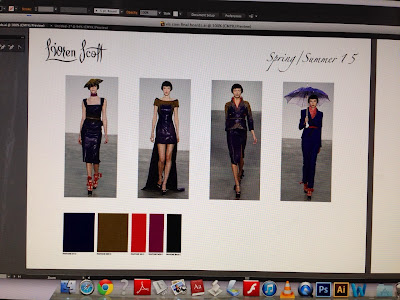
So that's everything up to speed! The next board I'll be working on is the board with my garment flats drawings on it, and then afterwards we'll put together our IT skills we've learned with Lynne and our hand-rendering skills we've learned in vis com with Vicky to create posed fashion illustrations which will be rendered on illustrator to make them look professional. I can't wait!
Hope everyone's having a good day despite the awful weather on this chilly wednesday morning :)
Lauren xoxo
I'm sitting in my vis com IT lesson as we speak and now I've FINALLY got my flats drawn that I was talking about before, I need them checked before I can scan them in to render on illustrator, but Lynne is doing tutorials with everyone at the mo, so I thought I'd tell you about my work so far while I wait!
OK. So, the first thing we did was learn basics on illustrator, which I made a post about, remember? (If not, here it is: http://laurensheperia.blogspot.co.uk/2013/10/intro-to-adobe-illustrator.html) We made a few different flats up after this first lesson, just to get used to different things, and I made a button template for my archive, and here they are:


So then, after I'd chosen, I had to draw some garment flats (hand-rendering) from the photos of the collection, which are the things I'm waiting to get checked as we speak! I found it more challenging when I did it than I was expecting. I hope they're ok, I don't really want to do them again haha! But anyway, here they are:


So finally, we started making up our art boards on illustrator. The first board we worked on was just a board showing the photos of the collection, the logo of the designer, and the main colours used. It was fun though, because we had to use pantone colour references on the boards and we had a pantone solid coated colour book to look through and match up our collection colours to the references in the book. It was such a fun lesson! The colour books are so pretty, and I have to admit I've become slightly obsessed with pantone colour referencing ever since, and I ordered a pantone phone case from pantone universe which I'm currently waiting to arrive! (I'm kind of addicted to internet shopping, can you tell?!)
Here's a few pictures I took of the solid coated colour referencing book:


Hope everyone's having a good day despite the awful weather on this chilly wednesday morning :)
Lauren xoxo
Intro to Adobe Illustrator
Hi everyone! Today at uni we started using Adobe Illustrator, which I'd never used before, but it's safe to say that I'm now hooked, it's so easy! I haven't done a lot on it yet, but today we learned how to draw a garment flat using a template from our archives, because we're doing a project at the minute where we have to illustrate a spring/summer catwalk collection using garment flats, so we will be needing it! I'm gonna do a post showing which collection I've chosen at some point. But anyway, I got used to the programme quite quickly, and, ta-da! Here's my first ever attempt at a garment flat! Not bad, eh? I'm pleased with it anyway, haha!

So all in all, I've had a good day today! A productive one at least! Tomorrow I'm gonna finish a drawing of a blouse, which will be a lot more of a challenge, but we'll see how it turns out. Wish me luck!
Lauren xoxo

So all in all, I've had a good day today! A productive one at least! Tomorrow I'm gonna finish a drawing of a blouse, which will be a lot more of a challenge, but we'll see how it turns out. Wish me luck!
Lauren xoxo
Subscribe to:
Posts (Atom)